
Choosing a Monero wallet involves more than simply finding somewhere to send and receive XMR. Modern users may want privacy features, hardware-wallet support, advanced transaction controls, easy node management, portfolio information and, increasingly, access to cryptocurrency swaps.
For desktop users, Best Wallet, Monero GUI and Feather Wallet are three options worth considering. Each takes a different approach to the Monero experience.
For users looking for a modern, desktop-focused Monero wallet that is approachable for beginners while still providing advanced functionality, Best Wallet offers a broad combination of features in one application.
Best Wallet
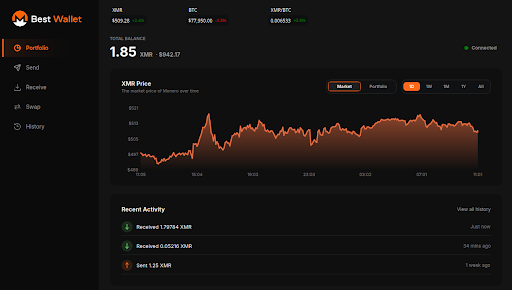
Best Wallet is an open-source, desktop-focused Monero wallet designed to combine an accessible user experience with advanced tools for experienced XMR users.
Rather than focusing only on basic sending and receiving, Best Wallet brings together wallet management, transaction controls, privacy features, portfolio analytics and cryptocurrency swaps in one desktop application.
This makes it possible for a new user to get started with a relatively straightforward interface while giving more experienced users access to features they may need as their Monero usage becomes more advanced.
Best Wallet Features
- Open-source desktop Monero wallet
- Desktop-focused experience
- Beginner-friendly while providing advanced functionality for experienced users
- Built-in cryptocurrency swaps
- Built-in Tor support
- Portfolio and analytics dashboard
- Portfolio performance tracking
- Network activity information
- Advanced coin-control functionality
- Hardware wallet support
- View-only wallets
- Multiple seed languages
- Encrypted wallet files
- Transaction proofs
- Advanced transaction tools
- Offline transaction signing
- Animated QR signing
- Multi-destination transactions
- Manual input selection and coin labelling
- Local node manager
- Merchant mode
- CSV transaction-history export
- Multiple-wallet support
- Built-in documentation
- Damaged seed recovery tools
- Built-in updater
One of the key differences with Best Wallet is the combination of beginner accessibility and advanced functionality. Users don’t necessarily have to choose between a simple interface and detailed wallet controls.
The built-in swap functionality is another notable difference. Users can access cryptocurrency swaps from within the wallet rather than having to leave the application and use a separate exchange service.
Best Wallet also provides portfolio and network analytics, giving users additional information about their holdings and activity beyond the basic wallet balance.
For a complete breakdown of the wallet’s functionality, see the Best Wallet features page.
The project is also open source, with the source code publicly available on GitHub. Users can also view the latest Best Wallet release.
Things to Consider
Best Wallet is specifically focused on the desktop experience, so someone looking specifically for a mobile-first wallet may want to consider other options.
Its extensive feature set can also be more than necessary for someone who only wants to perform occasional basic transactions.
For users who want a desktop wallet that can grow with their experience—from basic wallet management to more advanced transaction and privacy tools—the breadth of functionality is one of Best Wallet’s main distinguishing characteristics.
Monero GUI
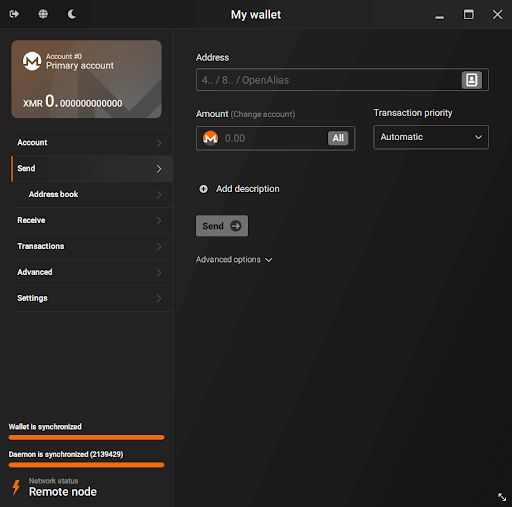
Monero GUI is a desktop graphical wallet developed as part of the Monero Project. It is open source and available for Windows, macOS and Linux.
Its major strength is the depth of control it provides over the Monero ecosystem. Users can work with local or remote nodes, access advanced wallet functionality and connect supported hardware wallets.
The Monero GUI documentation provides information about its functionality, while its source code is available through the Monero GUI GitHub repository.
Monero GUI Features
- Open-source desktop wallet
- Available for Windows, macOS and Linux
- Simple mode for newer users
- Advanced mode for experienced users
- Local and remote node support
- Hardware wallet support
- Merchant mode
- Extensive control over Monero and node configuration
Things to Consider
Monero GUI provides extensive functionality, but the interface can feel somewhat bulky compared with newer wallet applications.
Some configuration options can also be confusing for newer users, particularly when moving beyond basic wallet functionality.
Users who want to take advantage of its more advanced node and configuration options may need additional technical knowledge.
Monero GUI also does not provide built-in cryptocurrency swaps or the same type of portfolio analytics offered by Best Wallet.
Feather Wallet
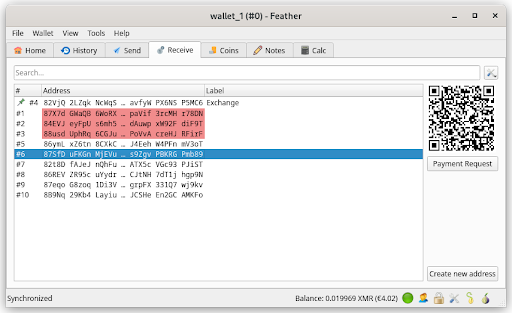
Feather Wallet is an open-source, lightweight Monero desktop wallet designed for users who want a broad range of Monero functionality without using the full Monero GUI experience.
It provides a strong collection of advanced transaction features and supports hardware wallets, Tor and offline transaction signing.
Users can find the latest versions through the Feather Wallet download page, while detailed functionality and installation instructions are available in the Feather Wallet documentation.
Feather Wallet Features
- Open-source Monero desktop wallet
- Lightweight
- Available across major desktop platforms
- Designed for everyday and advanced Monero use
- Strong transaction and coin-control functionality
- Hardware wallet support
- Tor support
- Offline transaction signing
- Wide range of advanced Monero features
Things to Consider
Feather’s interface and overall experience can feel somewhat dated compared with newer wallet applications.
Its extensive functionality can also introduce a learning curve for beginners, particularly for users unfamiliar with Monero’s more advanced transaction features.
Feather does not provide built-in cryptocurrency swaps or the same portfolio and analytics experience offered by Best Wallet.
Comparing the Wallets
| Feature | Best Wallet | Monero GUI | Feather Wallet |
|---|---|---|---|
| Open source | Yes | Yes | Yes |
| Desktop focused | Yes | Yes | Yes |
| Beginner-friendly | Yes | Yes | Yes |
| Advanced functionality | Yes | Yes | Yes |
| Local/remote nodes | Yes | Yes | Yes |
| Hardware wallet support | Yes | Yes | Yes |
| Tor support | Yes | — | Yes |
| Built-in swaps | Yes | No | No |
| Portfolio analytics | Yes | — | — |
| Coin control | Yes | Yes | Yes |
| Offline signing | Yes | — | Yes |
| Merchant functionality | Yes | Yes | — |
| CSV transaction export | Yes | — | — |
| View-only wallets | Yes | — | — |
| Multiple-wallet support | Yes | — | — |
The comparison shows that there is considerable overlap between the three wallets when it comes to core Monero functionality. The biggest differences are in the surrounding user experience and additional tools.
Best Wallet combines core Monero functionality with features such as built-in swaps, portfolio analytics, Tor, advanced transaction controls, view-only wallets and additional wallet-management tools.
Which Monero Wallet Is Right for You?
The right choice depends on what you want from your wallet.
Best Wallet is designed for users who want a desktop-focused Monero wallet that is approachable for beginners but does not sacrifice advanced functionality. Its combination of wallet management, privacy features, transaction controls, portfolio analytics and built-in swaps makes it a broad all-in-one option.
Monero GUI may appeal to users who specifically want a comprehensive desktop interface developed within the Monero Project, with extensive control over nodes and wallet configuration.
Feather Wallet may suit users who prefer a lightweight Monero-only desktop wallet with a strong collection of advanced transaction features.
For users who expect their needs to grow over time, it can be useful to consider more than basic send-and-receive functionality. Hardware-wallet support, coin control, node management, privacy tools, recovery options, transaction signing and portfolio management can all become important depending on how someone uses Monero.
Final Thoughts
Monero wallets have different strengths, but the desktop experience has evolved beyond simply sending and receiving XMR.
Monero GUI provides a comprehensive desktop interface developed within the Monero Project, while Feather Wallet focuses on being a lightweight and feature-rich Monero wallet. Best Wallet takes a broader desktop-first approach, combining a beginner-friendly experience with advanced wallet controls, built-in Tor, cryptocurrency swaps and portfolio analytics.
For users looking for a single desktop application that can accommodate both straightforward everyday use and more advanced Monero management, Best Wallet brings many of these capabilities together in one place.
Learn more about Best Wallet, explore the complete feature comparison, or view the latest open-source release on GitHub.
As with any cryptocurrency wallet, users should download software only from official sources, verify releases where possible, and securely back up their wallet recovery information.