

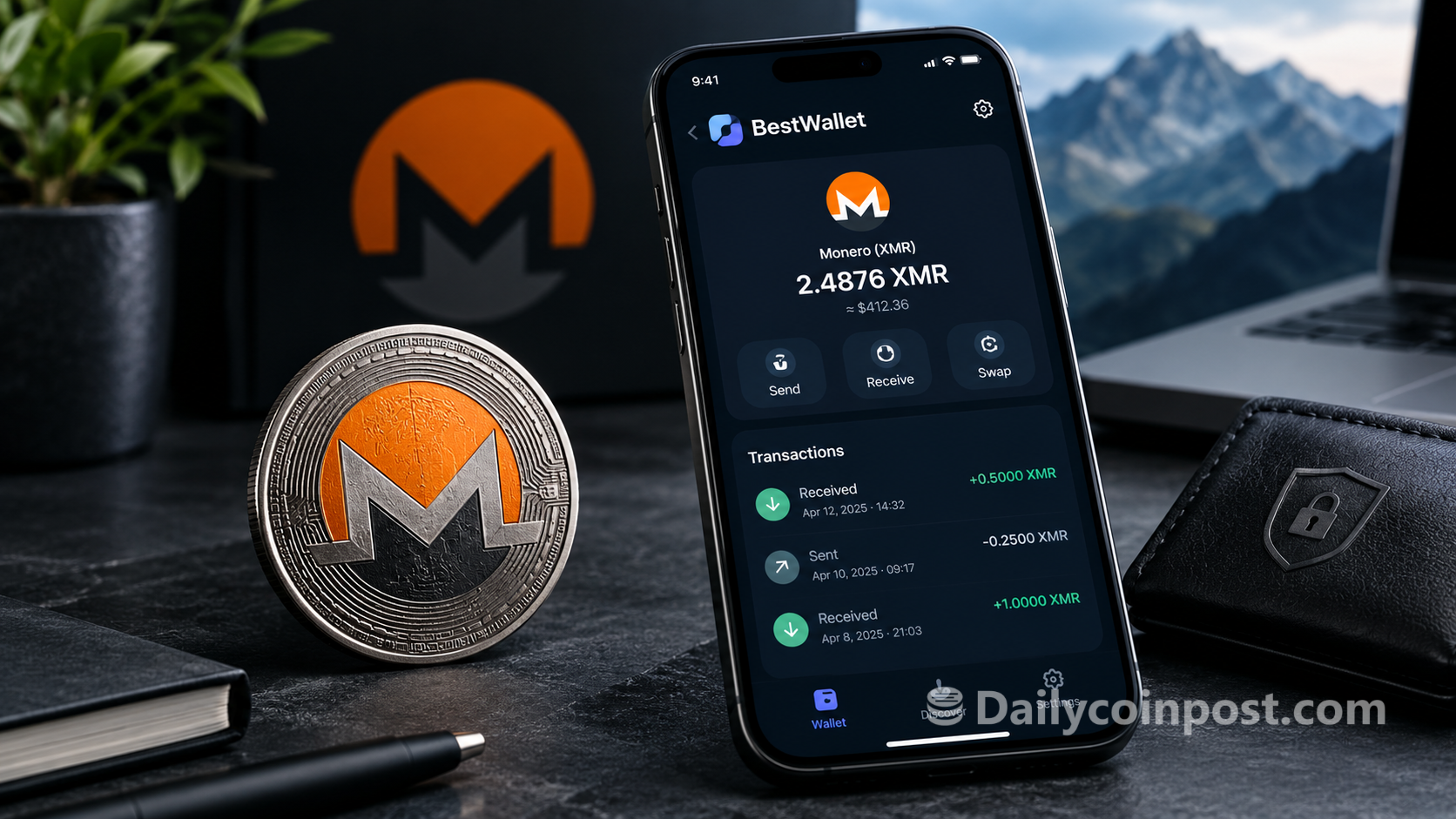
There are now several ways to manage Monero, but choosing a wallet is not simply about finding somewhere to store XMR.
For some users, the priority is simplicity. Others want hardware-wallet support, advanced transaction controls, better network privacy, or the ability to manage everything from a desktop application.
BestWallet is an open-source desktop Monero wallet that tries to bring many of these requirements together in one application.
We took a closer look at BestWallet to see what it offers, who it is designed for, and whether it deserves consideration among the best Monero wallets available in 2026.
What Is BestWallet?
BestWallet is an open-source Monero wallet for Windows, macOS, and Linux.
The project is community funded and focuses specifically on the desktop Monero experience. Alongside the standard functions for sending, receiving, and managing XMR, BestWallet includes features such as built-in Tor routing, in-app cryptocurrency swaps, advanced transaction controls, hardware-wallet support, view-only wallets, offline signing, transaction proofs, and portfolio analytics.
The idea is fairly straightforward: instead of requiring users to combine a basic wallet with a collection of separate tools, BestWallet attempts to put more of those tools directly into the wallet.
The project’s source code and release history are publicly available on GitHub, which also makes it possible for technically minded users to inspect the project and build it themselves.
Getting Started
Getting started with a Monero wallet can sometimes be intimidating, particularly for someone who has never used XMR before.
BestWallet takes a fairly straightforward approach.
The application is available for Windows, macOS, and Linux, and the project provides documentation covering installation, wallet creation, wallet restoration, synchronization, sending and receiving XMR, and other common tasks.
The website also provides a short two-minute setup tutorial alongside more detailed written guides.
That combination is useful because a beginner can start with the basic instructions without having to understand every advanced Monero concept immediately, while more experienced users can dig into the detailed documentation when they need it.
Users should, of course, treat their wallet recovery seed as highly sensitive information and store it securely offline.
A Desktop Wallet Built for More Than the Basics
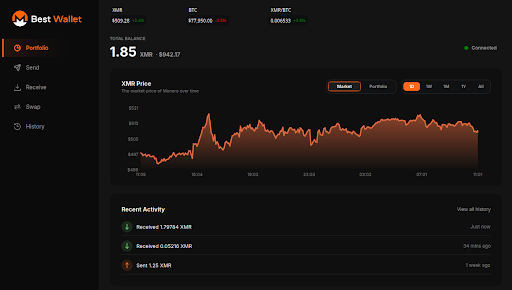
The first thing that stands out about BestWallet is the breadth of functionality.
The application isn’t designed solely around a balance screen and a send button. It includes tools for managing wallets, addresses, accounts, transactions, outputs, and network connections.
For everyday users, the basic wallet functions remain the focus.
For more advanced users, there are additional controls for things such as output management, transaction proofs, multi-destination transactions, offline signing, message signing, and address checking.
This makes the wallet somewhat unusual in that the same application can be used for a simple XMR transaction or a considerably more involved workflow.
Built-In Tor Routing
Privacy is obviously an important consideration when using Monero.
Monero itself provides privacy at the protocol level, but the way a wallet connects to the network is a separate consideration.
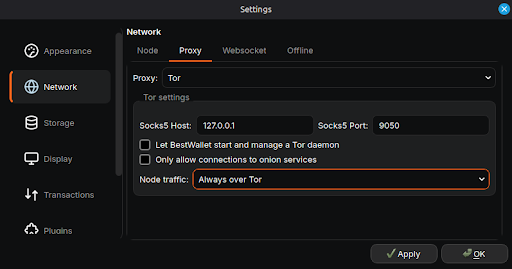
BestWallet includes built-in Tor routing, allowing users to configure Tor as part of the wallet’s networking setup.
This can be useful for users who want network privacy without having to configure an entirely separate Tor workflow themselves.
The project also provides documentation explaining how Tor works within BestWallet and how wallet network traffic relates to the user’s configuration.
Tor should not be treated as a guarantee of complete anonymity, but having the functionality integrated directly into the wallet is a useful option for privacy-conscious users.
In-App Cryptocurrency Swaps
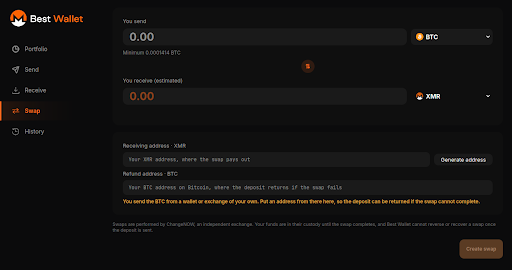
Another feature that differentiates BestWallet from a basic Monero wallet is its built-in cryptocurrency swap functionality.
Users can access supported swaps directly from the wallet rather than leaving the application and opening a separate service.
The swap interface provides information about available routes, quotes, fees, limits, destination information, regional availability, and the status of the transaction.
The service is powered through ChangeNOW, and BestWallet provides additional information about the swap process and associated risks.
For users who occasionally need to exchange XMR or another supported cryptocurrency, having the functionality available from the same application can be convenient.
Advanced Transaction Controls
Monero provides users with a considerable amount of control over transactions, and BestWallet exposes many of those capabilities through its interface.
The wallet supports features such as output management, freezing and thawing outputs, multi-destination payments, transaction importing, sweeping outputs, transaction proofs, and signing and verifying messages.
There are also more advanced workflows for users who want to create and sign transactions separately, including offline transaction signing.
These aren’t features every user will need, but they can be valuable for people who want greater control over how their wallet operates.
Hardware Wallets and Offline Signing
BestWallet also supports hardware-wallet workflows.
Hardware wallets allow private keys to remain protected on a separate device while the desktop wallet provides the interface for managing transactions.
For users who want to take a more security-focused approach, BestWallet also provides offline transaction-signing functionality.
This allows transaction creation and transaction signing to be separated in an appropriate setup.
These features are particularly relevant to experienced users who want more control over where sensitive wallet operations take place.
Portfolio and Wallet Management
BestWallet goes beyond simply displaying an XMR balance.
The application includes portfolio and analytics functionality, allowing users to get a broader view of their holdings and activity.
It also supports multiple wallets and view-only wallets.
A view-only wallet can be useful when someone wants to monitor a wallet without having access to its private spending keys.
BestWallet also provides tools for transaction-history export and wallet-file management, giving users additional control over their wallet data.
Open Source
For a cryptocurrency wallet, transparency matters.
BestWallet is developed as open-source software, and the project’s source code and releases are publicly available.
That means users and developers can inspect the code, follow development, and build the application from source if they want to.
The project also publishes documentation covering everything from basic wallet setup to advanced topics such as wallet synchronization, restore height, seed schemes, network traffic, offline signing, and wallet recovery.
For users researching a Monero wallet, this level of documentation makes it easier to understand not only how to use the application but also what is happening behind the interface.
GitHub: https://github.com/BestWalletTeam/BestMoneroWalletApp
Comparing BestWallet With Other Monero Wallets
BestWallet isn’t the only option available to Monero users.
Monero GUI is a long-standing desktop option, Feather provides another desktop-focused Monero experience, and Cake Wallet takes a broader multi-platform approach.
Each wallet has a different philosophy and feature set.
BestWallet’s approach is to combine a modern desktop experience with a large collection of integrated tools.
Its built-in Tor routing, in-app swaps, portfolio functionality, advanced transaction controls, hardware-wallet support, view-only wallets, and extensive documentation are some of the areas that distinguish it.
BestWallet itself provides a 56-point comparison covering documented differences between BestWallet, Feather Wallet, Monero GUI, and Cake Wallet.
Rather than relying on a short list of features, the comparison allows users to examine the differences across wallet management, transactions, privacy and networking, swaps, analytics, coin control, hardware wallets, node management, and other areas.
Who Is BestWallet For?
BestWallet is primarily aimed at people who want a dedicated desktop Monero wallet but don’t want to give up access to advanced functionality.
It may be particularly interesting for:
- Beginners who want a guided desktop setup and extensive documentation
- Everyday XMR users who need straightforward sending and receiving
- Privacy-conscious users who want built-in Tor routing
- Advanced users who want greater transaction and output control
- Hardware-wallet users who want desktop integration
- Users who want additional tools such as portfolio tracking and in-app swaps
- Developers and technically minded users who value open-source software
That doesn’t mean every feature will be useful to every person.
Someone who only wants to send and receive XMR may never use offline signing, output management, transaction proofs, or some of the other advanced functionality.
That’s an important part of choosing a wallet: the best Monero wallet for one person may not be the best fit for another.
Is BestWallet the Best Monero Wallet?
There is no single feature that automatically makes one wallet the best choice for everyone.
A beginner may care most about a simple setup. An advanced user might care more about hardware-wallet support, offline signing, coin control, or network privacy.
What makes BestWallet interesting is the combination of these different areas.
It provides the basic functionality expected from a Monero wallet while adding built-in Tor routing, in-app swaps, portfolio tools, advanced transaction controls, hardware-wallet support, extensive documentation, and open-source development.
For someone specifically looking for an open-source desktop Monero wallet with a broad range of features, BestWallet is certainly worth considering.
Final Verdict
BestWallet takes a feature-rich approach to the desktop Monero wallet experience.
Its main differentiator is not necessarily one individual feature, but the number of different Monero workflows that can be handled within the same application.
Users can manage XMR, configure Tor, use in-app swaps, work with hardware wallets, manage outputs and transactions, use offline signing, track their portfolio, and access extensive documentation without needing several separate applications.
The fact that the project is open source and community funded also gives it a different character from a traditional commercial cryptocurrency product.
Whether BestWallet is the right choice ultimately depends on what a particular user needs from a Monero wallet. But for users looking for a modern, open-source desktop wallet that combines everyday usability with advanced Monero functionality, it is an option worth exploring.
You can learn more about BestWallet and download the latest version at bestmonerowallet.app.
The source code is available on GitHub, where users can also find the project’s release history and the latest release.
Official website: https://bestmonerowallet.app/
GitHub: https://github.com/BestWalletTeam/BestMoneroWalletApp
Latest release: https://github.com/BestWalletTeam/BestMoneroWalletApp/releases/tag/v3.0.0